(7.2) Finding Products by Keyword – How to Use Helium10 to Find Potential Products

Finding Products by Keyword – How to Use Helium10 to Find Potential Products
Eazyppc welcomes you to the post ‘Finding Products by Keyword – How to Use Helium10 to Find Potential Products’. You should read and thoroughly understand the previous posts, as Eazyppc uses terms and concepts that were explained in earlier lessons throughout the later ones.
Posts you should be familiar with before reading this one:
- (1.4) Types of Market Trends
- (2.3) Competitor Strength Through Reviews.
- Post series (6.) – Important⚠️
Helium10’s Blackbox provides two extremely powerful tools for finding potential products: product search and keyword search. Regardless of which direction you start from, the destination is the same: a core keyword set and a corresponding business plan. For new Sellers, you should practice and master both methods, then determine the approach that works best for you through hands-on experience.
Access the tool via Helium10>Blackbox>Keywords

The highlighted items are those Eazyppc recommends you use in your filters. Additionally, other fields such as ‘Best Sales Period’ can be applied when researching products with seasonal or trend-based sales. The metrics in this tool are similar to those in the product search tool. However, the key difference between the two tools is this: when using the keyword-based search tool, Helium10 will display certain metrics that are extracted based on data from the top-ranking products.

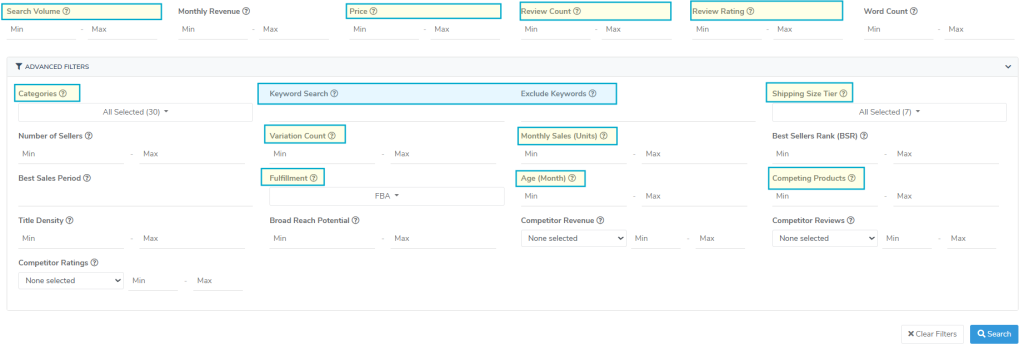
For example, the Monthly Sales (Units) metric is defined as ‘Average number of sales from the previous 30 days, for the top products’ – the average number of orders in the last 30 days, calculated based on top-ranking products.
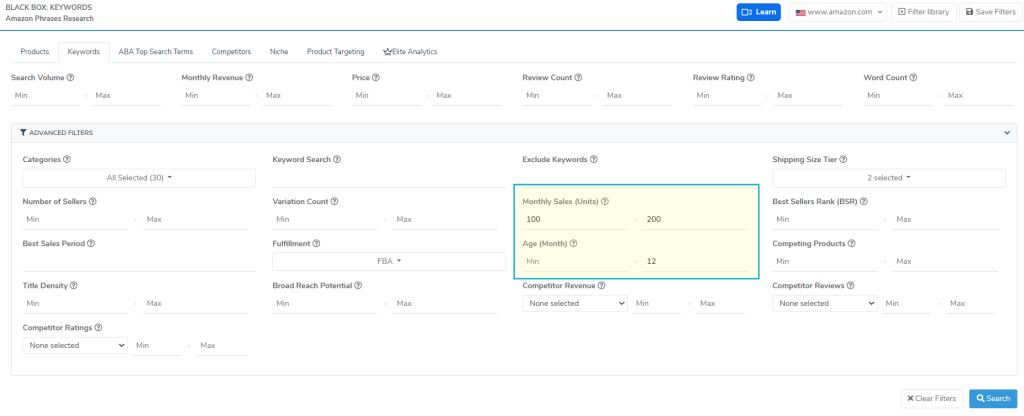
You can try a real-world example as follows: in the Blackbox keyword filter settings, set Age – Months (the product’s age in months) to a maximum of 12, and Monthly Sales (Units) max to 200 (as of March 2025). One of the results returned is the keyword “translator earbuds“.

When you check this keyword directly on Amazon.com and filter out sponsored products, you will notice that the organic results include products with more than 200 orders in the last 30 days – exceeding the maximum value set. However, all products appearing do satisfy the “under 12 months” condition in the ‘Age – Months‘ field.
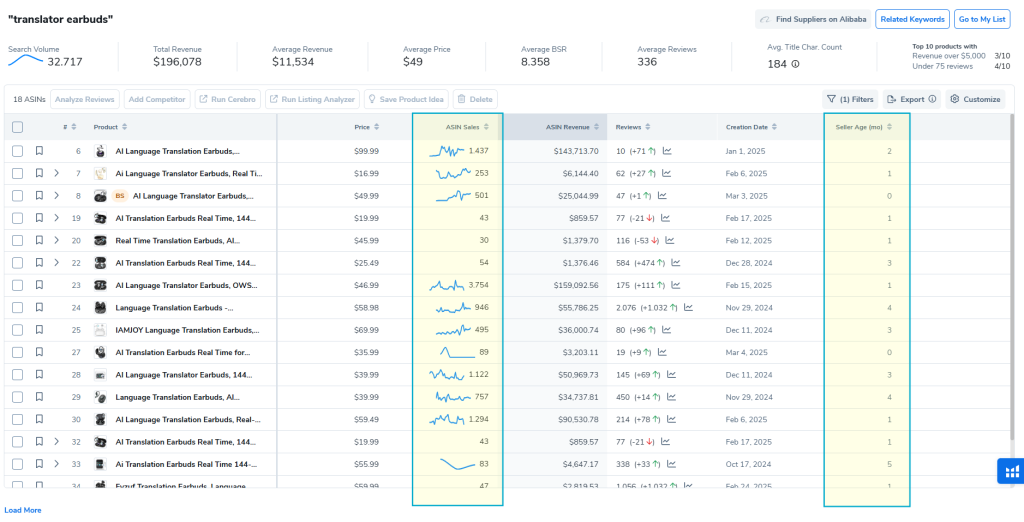
This shows that: when filtering by keyword, metrics such as “Monthly Sales” do not apply to all products displayed for that keyword — they are only based on a group of “top products” as determined by Helium10 -> this can lead to misinterpretation when analyzing data.
After selecting your filters and receiving results from Black Box, you research each keyword in the results according to the factors covered in the post series (6.) that Eazyppc has covered, including:
Tất cả nội dung trên blog này chỉ nhằm mục đích cung cấp thông tin và chia sẻ kinh nghiệm cá nhân về kinh doanh trên Amazon. Eazyppc.com không đảm bảo bất kỳ kết quả cụ thể nào từ việc áp dụng các chiến lược hoặc thông tin được chia sẻ.
Việc kinh doanh có thể tiềm ẩn rủi ro, và mỗi cá nhân cần tự nghiên cứu, đánh giá trước khi đưa ra quyết định. Eazyppc.com không chịu trách nhiệm đối với bất kỳ tổn thất, thiệt hại nào phát sinh từ việc áp dụng thông tin trên blog này.


Chấp thuận Điều khoản & Chính sách
Trước khi tiếp tục truy cập website Eazyppc.com, bạn vui lòng đọc và đồng ý với: