
Negative Keywords/Search Terms – Ultimate
- The Portfolio-based negative keyword/Search Term adjustment tool helps Sellers make changes via Bulk Operation without having to manually process an Excel file containing up to 500,000 rows.
- With this tool, for example – a Seller with 5,000 campaigns and 50 keywords/Search Terms to negative -> 5,000 × 50 = 250,000 rows the Seller would need to edit. However, with this tool, you simply upload a file and download the fully edited file with all 250,000 rows complete.
User Guide:
Sellers, please follow the instructions exactly – if you make a mistake at any step, the tool will not work. An “Invalid” error means the file uploaded by the Seller does not match the instructions; please go back to the first step. Thank you!
0/ Prepare the list of keywords/Search Terms to negative
- Users can use the tool: Search Term Filter Tool
1/ Prepare the keyword/Search Term file to negative (File 1):
- File 1: Enter your keywords into this Excel file Eazyppc.com – Bulk Negative Keywords/Search Terms
2/ Download the Sponsored Products bulkfile from Amazon Ads Bulk Operation (File 2):
- Select time period – Today
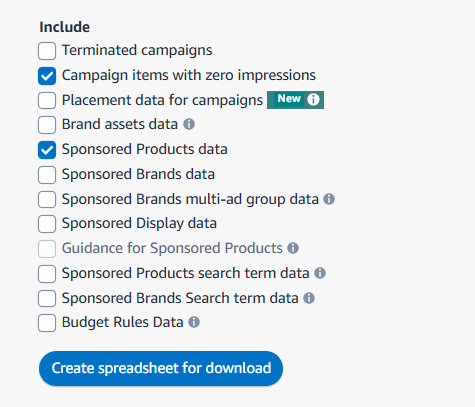
- Open the downloaded file -> Delete the Portfolios sheet
- Keep only the Sponsored Products Campaigns sheet
- You should save the Portfolio information before deleting
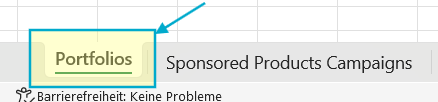
-> Save the processed file (File 2)
3/ Use the Tool:
- Match Type Selection: Select the Negative type – applied to all keywords to be Negatived
- File Size Management: Leave as default – if unable to create the file, contact Nam for adjustments
- Portfolio name:
- You need to copy and paste or enter the exact name of the Portfolio where you want to apply the keywords/Search Terms to be negatived. You can separate multiple Portfolios with a comma ‘,’
- If left blank, the tool will automatically set up for the entire account.
4/ Upload
- Upload File 1 to Keywords File
- Upload File 2 to Campaign Data File
5/ Click Create, the Tool will automatically download the file (there may be more than 1 file automatically downloaded if the number of Campaigns and keywords to be negatived is large)
6/ Upload each file to Amazon via Bulk Operation
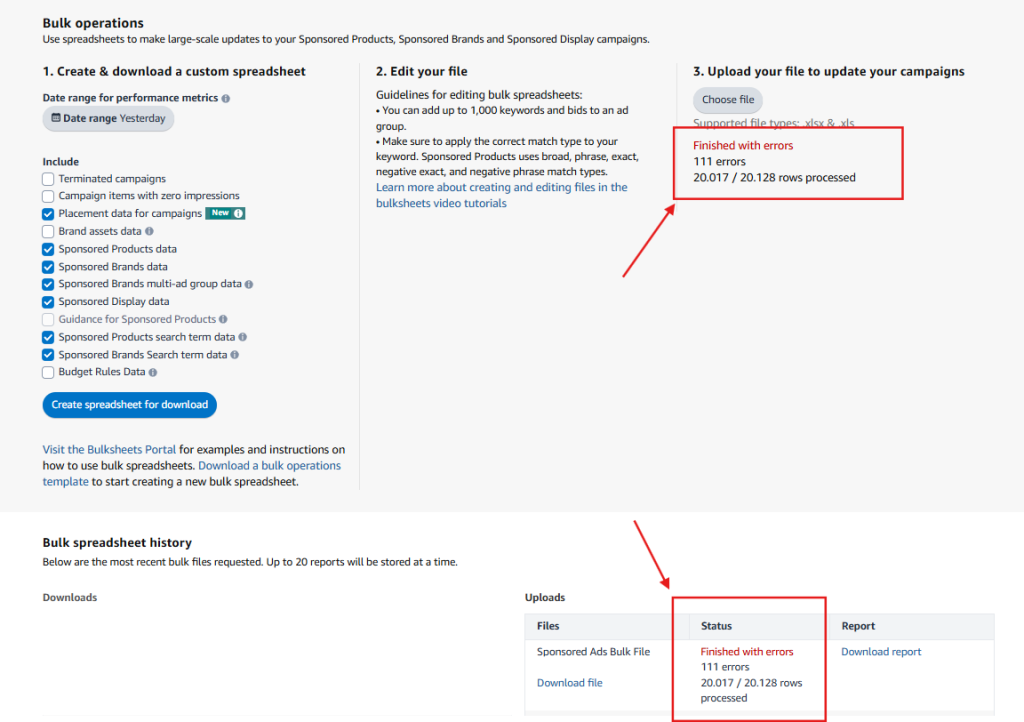
- This means it was successful – 20,017 rows have been uploaded successfully. Click Download report to check what the 111 error rows are. Usually, the errors are due to keywords/Search Terms containing special characters like ‘-‘. Otherwise, there should be no errors.
You must be logged in to view this content. You must be logged in to view this content.
Negative Bulkfile Creation Tool
Negative Keywords toàn bộ tài khoản bằng Bulkfile
Match Type Selection
File Size Management
Portfolio Filter (Optional)
Keywords File
Required format: CSV or Excel (.csv, .xlsx, .xls)
Required column: "Customer Search Term"
Campaign Data File
Required format: Excel (.xlsx, .xls)
Required columns: "Entity", "Campaign ID"
Optional column: "Portfolio name (Informational only)"
Processing your files...
