
Keyword Bid Adjustment Tool – Ad Campaigns by Organic Rank
Note: Users can refer to the theoretical content about Organic Rank – the natural display position of a product here.
User Guide:
Sellers, please follow the instructions exactly – if you make a mistake at any step, the tool will not work. An “Invalid” error means the file uploaded by the Seller does not match the instructions; please go back to the first step. Thank you!
1/ Prepare the data files:
To use this Bid Adjustment by Organic Rank Tool, Users need to prepare 2 types of data files:
a/ Bulkfile from Amazon’s Advertising Console
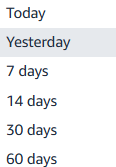
- After running PPC ads, Sellers can access Ad Console to download advertising data. The available time periods for downloading data:
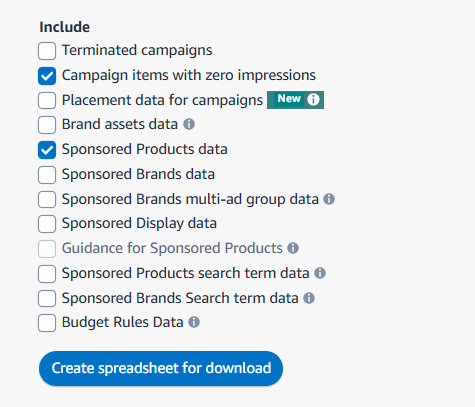
- After selecting the time period, check the options as shown below to get the data
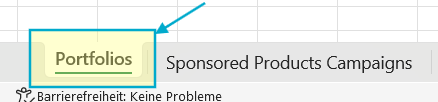
- Open the downloaded file -> Delete the Portfolios sheet
- -> Keep only the Sponsored Products Campaigns sheet
b/ Organic Rank data from Cerebro
- Access Helium10’s Cerebro tool > enter your ASIN > Click ‘Get keyword’

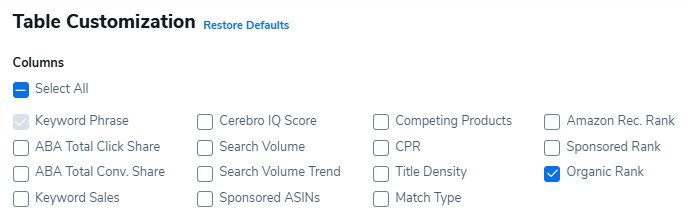
- Then, select Customize > Organic Rank – Note: uncheck all other boxes
2/ Use the Tool:
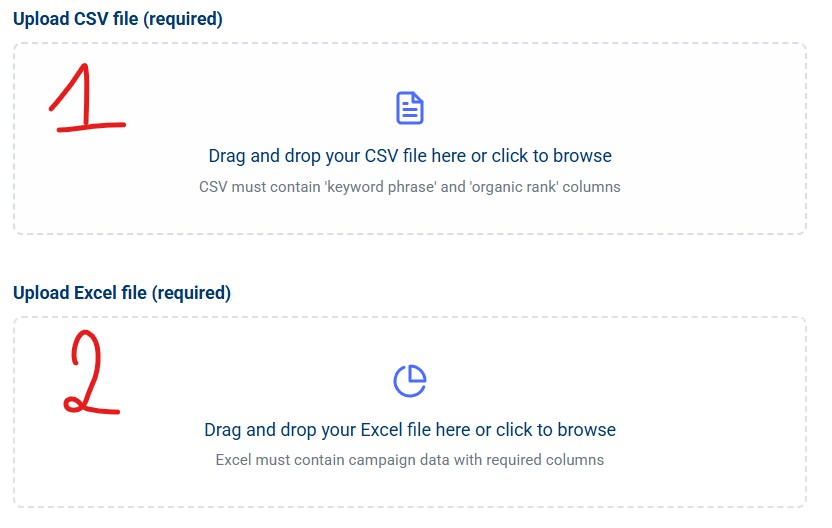
Access Use Tool, then upload the files as follows:
- 1 = Organic Rank file from Cerebro
- 2 = Bulkfile from Advertising Console
- Performance metrics filters = enter filter metrics – Note: If left blank, the tool will process all keywords regardless of ad performance metrics.
- Organic Rank Filter = Select the condition to process keywords that meet the criteria (e.g. >50)
- Bid change = Select increase/decrease and the adjustment percentage
-> Click ‘Run’
You must be logged in to view this content. You must be logged in to view this content.
Organic Rank Bidding Tool
Upload files, configure filters, and adjust keyword bid values based on organic rank and performance metrics.
