(13.1) Payment Report – Overview of the Payment Process – How to View Reports and Track Cash Flow on Amazon – Order and Cash Flow Tracking

Payment Report – How to View Reports and Track Cash Flow on Amazon
Eazyppc welcomes you to the article ‘Payment Report – How to View Reports and Track Cash Flow on Amazon’ – you should read and thoroughly understand the previous posts, as Eazyppc uses terms and concepts that were already explained in earlier lessons.
In this article, Eazyppc will walk through Amazon’s cash flow along a timeline to help users easily understand the metrics in the Payment section of Amazon Seller Central.
1/ Overview of the Payment Process on Amazon
When an order is placed, the payment process works as follows:
- Collecting payment from the buyer: Amazon receives payment from the customer. 2 payment methods are available: immediate payment (for B2C – Direct consumers on Amazon) or deferred payment via invoice (Pay by Invoice PBI – applicable to B2B customers).
- Amazon processes the payment: Amazon holds this amount for a period of time (these periods vary depending on the order). During this time, Amazon deducts applicable service fees (referral fees, FBA fees, advertising fees…), processes refund requests, and applies temporary fund-hold policies (Deferred Transactions, Account Level Reserve).
- -> Sellers can read more about working capital to avoid cash flow disruptions when selling on Amazon.
- Amazon pays out to the Seller: After a settlement period (14 days), Amazon consolidates all “ready-to-disburse” funds (Released — meaning Amazon has confirmed the order is fully processed with no issues) into Funds Available & into a settlement period -> then transfers the final amount to your registered bank account.
There are two main processing flows for order cash flow:
A. Standard Orders – B2C (Customers pay immediately)
- Customer places order & pays: The customer pays at the time of purchase.
- The transaction and order appear in your Seller Central account with a “Deferred” status.
- Main reason: The Delivery date policy. Amazon holds sales proceeds for a period of time (7–14 days) after successful delivery to ensure customer satisfaction and to cover potential returns, A-to-z Claims, or credit card chargebacks.
- Example timeline: Order placed on 1/1 -> Shipped on 1/1 -> Delivered successfully on 4/1 -> Funds held until end of 11/1 (4/1 + 7 days) -> Transaction moves to “Released” on 11/1.
- Transaction is disbursed (Released): Once the hold period under the delivery date policy ends, the transaction status changes to “Released”.
- Rolled into the settlement period: These “Released” transactions will be included in the next (settlement period)

B. Invoice Orders – B2B (Pay by Invoice – PBI)
- Pay by Invoice is a payment method that allows B2B customers to purchase and receive an invoice for deferred payment. Each customer has a “credit terms” limit set by Amazon (e.g., Net 30 — meaning the invoice must be paid within 30 days from the invoice date).
- Customer places order (via PBI): The B2B customer selects invoice as the payment method.
- Transaction appears & is deferred (Deferred): The PBI order appears in your account with a “Deferred” status due to ‘Invoiced order’.
- Amazon is waiting for the buyer to pay the invoice (Orders are pending buyer payment).
- Transaction is disbursed (Released): The transaction status changes to “Released” when the buyer pays the invoice to Amazon.
- Amazon payment guarantee: If the buyer is late in paying, Amazon will still pay the seller on the 15th day after the invoice due date, even if the B2B buyer has not yet paid.
- Rolled into the settlement period: PBI transactions that are “Released” (after the customer pays or after 15 days past due) will be included in the settlement period (settlement period)
- Important notes:
- Sellers are not allowed to send invoices or request payment directly from customers for PBI orders. Amazon handles this.
- If the Seller wants to receive funds sooner, they must pay a fee of 1.5% of the total revenue.

2/ General Definitions in Payment Processing
- Settlement Period: Amazon consolidates all “Released” transactions within one period (typically 14 days) to calculate the amount to pay the Seller.
- Payment calculation: Amount you receive = (Total ‘Released‘ revenue) – (Total ‘Refund‘) – (Total related costs) – (‘Account Level Reserves‘ ).
- Disbursement: Amazon initiates a transfer to the Seller’s registered bank account.
- Time for funds to arrive at the bank: It may take up to 5 business days for the funds to appear in your bank account after Amazon has initiated the transfer.

3/ Explanation of Reports and Metrics
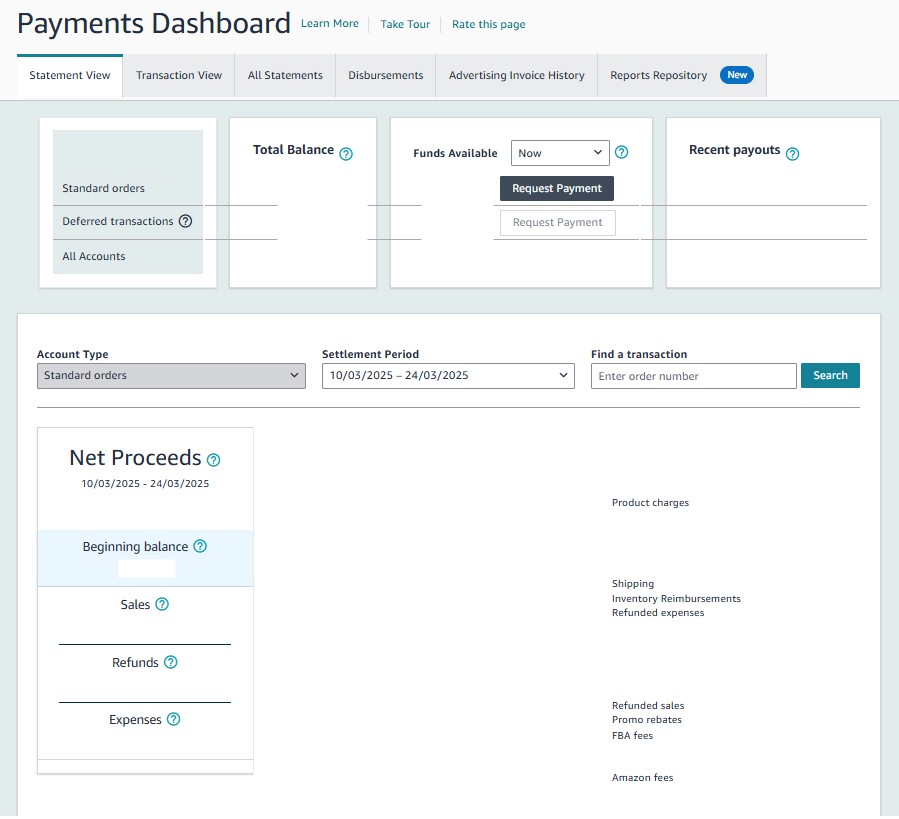
1. Statement View:
- This is the main summary page, giving Sellers a high-level overview of their financial status within a settlement period.
- Deferred Transactions: Funds from transactions that have not yet been “Released” (including those waiting for successful delivery and those waiting for PBI invoice payment) will not be counted in “Available Funds” for the current period.
- Account Level Reserves: The amount Amazon holds back to cover all potential risks (A-z Claims, chargebacks, returns…). This amount is independent of deferred transactions (Deferred Transactions).
- Contains items such as Beginning Balance, Sales, Refunds, Expenses.
- Beginning Balance: The amount carried over from the previous settlement period, including Account Level Reserves and any failed payments (if applicable).
- Sales: Total revenue collected from orders, including:
- Product Charges: Product price multiplied by units sold.
- Shipping: Shipping fees collected from customers.
- Tax: Sales tax collected from customers.
- Promo Rebates: Deductions for discount and promotional programs you created.
- Other: Other items
- Refunds: Total amount refunded to customers or related costs.
- Refunded Expenses: Refund of fees previously charged by Amazon
- Refunded Sales: Refund amount returned to the customer
- Expenses: Fees that Amazon deducts from the Seller’s account.
- Amazon Fees – Summary of all fee types
- FBA Fees: FBA fees not directly tied to individual orders, such as storage fees and inventory removal fees.
- Cost of Advertising: Amount spent on advertising on Amazon.
- Other: Other fee types such as coupon usage fees, etc.
- Account Level Reserves: This is the amount Amazon temporarily holds to ensure you have sufficient funds to cover potential A-to-z claims or credit card chargebacks that may arise in the future. Common reasons for this reserve include:
- Open A-to-z claims.
- A chargeback within the past 90 days.
- Sales performance metrics below Amazon’s standards.
- Account under review (e.g., due to a sudden spike in sales, or a new seller with a long estimated delivery time).
- Income tax withholding requirements under local regulations.
- Important note: This is different from “Deferred Transactions”.
- Sellers can go to ‘All Statements‘ to download the summary report by settlement period
2. Transaction View:
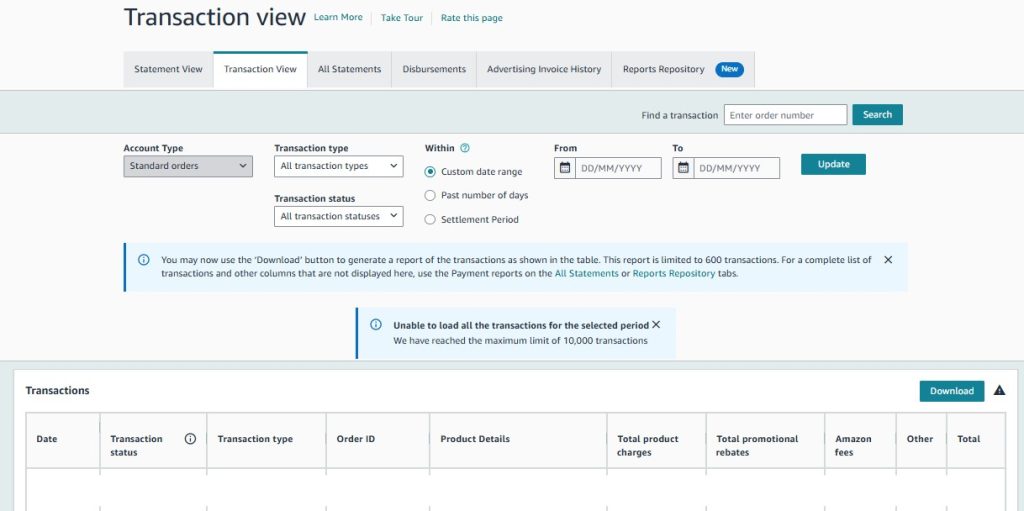
- Displays the detail of each transaction (orders, refunds, Amazon fees charged…) within a date range you select
- Important for tracking status: Deferred or Released.
- How to view Deferred orders: Go to Transaction View, select the “Transaction Status” filter as Deferred transactions. PBI orders waiting for buyer payment will appear in this list alongside other orders being held due to delivery reasons.
3. Deferred Transactions (Concept & Report):
- Includes all transactions that have not yet been disbursed.
- Main reasons for deferral:
- Delivery date policy: Waiting for confirmation of successful delivery and the hold period to pass.
- Waiting for the buyer to pay the invoice (Invoiced orders – PBI).
- You can view the list of these transactions and their reason for deferral in Transaction View (select the ‘Deferred transactions’ filter) or download the dedicated ‘Deferred Transaction’ report.
4. Disbursements & Settlement Reports:
- Displays the amount Amazon has transferred to your bank account in each settlement period and the status of that transfer.
- Contains Settlement Reports: The most detailed report covering all financial transactions within a specific settlement period.
5. Recent Payout:
- The amount paid out in the most recent payout period
6. Handling Refunds
- B2C Orders: Refunds are processed and deducted from the Total Balance.
- Pay by Invoice (PBI) Orders:
- If the refund is processed before the buyer has paid the invoice: The refund amount will be held and automatically offset against that order’s revenue when the transaction is “Released” (i.e., when the buyer pays or after 15 days past due).
- If the refund is processed after the buyer has already paid the invoice: The refund amount will be immediately deducted from the “Available Balance”.
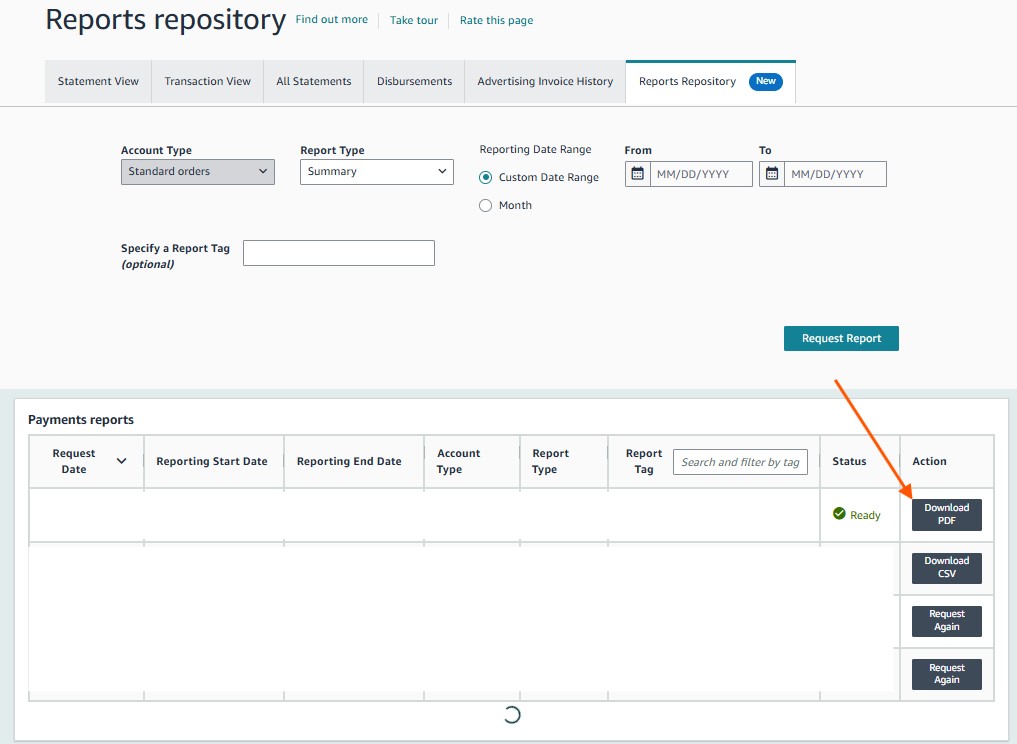
7. Viewing Reports via the Reports Repository
- Note: This information is not to be considered accounting or tax advice, and has no legal standing. All fees already include applicable Value Added Tax (VAT).
- Summarizes all income and expense categories, with detailed transfer amounts in PDF format
4/ Reasons Why Funds Have Not Been Paid Out in a Payout Period
- Funds are deferred (Deferred Transactions): Due to Delivery Date Policy completing OR waiting for the customer to pay a PBI invoice.
- Funds are being held for Account Level Reserve
- Incorrect or incomplete bank/credit card information.
- Note: Each time you update your bank information, there is a 3-day security hold before Amazon can initiate a transfer.
- Negative account balance.
- Account has performance issues or suspicious activity: Sellers can check notifications under Performance Notifications.
5/ Other Notes
- If Advertising Spend is high but the account Balance is insufficient, Amazon will charge the additional fees to your credit card
- Amazon currently applies a 5% cross-border service tax on Referral Fees and a 5% tax on advertising costs running on Amazon’s platform, remitted to the Vietnamese government
Tất cả nội dung trên blog này chỉ nhằm mục đích cung cấp thông tin và chia sẻ kinh nghiệm cá nhân về kinh doanh trên Amazon. Eazyppc.com không đảm bảo bất kỳ kết quả cụ thể nào từ việc áp dụng các chiến lược hoặc thông tin được chia sẻ.
Việc kinh doanh có thể tiềm ẩn rủi ro, và mỗi cá nhân cần tự nghiên cứu, đánh giá trước khi đưa ra quyết định. Eazyppc.com không chịu trách nhiệm đối với bất kỳ tổn thất, thiệt hại nào phát sinh từ việc áp dụng thông tin trên blog này.


Chấp thuận Điều khoản & Chính sách
Trước khi tiếp tục truy cập website Eazyppc.com, bạn vui lòng đọc và đồng ý với: