(3.3) Financial Planning for Your Product.

Financial Planning for Your Product
Eazyppc welcomes you to the guide ‘Financial Planning for Your Product‘ – understanding the content in this post will be much easier if you have already read the previous ones. This is because Eazyppc uses terms and concepts that were explained in earlier posts.
First, you should have a clear understanding of the various costs that can arise throughout the entire operation — this is also one of the biggest challenges new sellers face, often leading to situations where they have revenue but no profit. In the previous post, Eazyppc walked you through how to project advertising costs and several other related expenses. This post will give you a more detailed breakdown of the costs you need to be aware of before importing and shipping goods to the US.
1/ Account Maintenance & Supplier Purchasing Costs
Amazon Account Fee:
- A Professional seller account on Amazon costs $39.99/month. This is a fixed fee, independent of your sales volume.
Product Sourcing Cost:
- The cost you pay to the manufacturer, supplier, or sourcing agent who procures goods on your behalf.
2/ Shipping Costs from Supplier to Amazon Warehouse
Shipping costs can vary depending on the shipping method and origin location. The two most common shipping methods are sea freight (sea) and air freight (air) to the Amazon warehouse door, plus the cost of moving goods from the warehouse door to the storage shelves (inbound fee) charged by Amazon.
Sea Freight:
- Shipping costs from Vietnam or China to the US are typically calculated by m3 (Cubic Meter), ranging from $200 – $250/CBM as of March 2025.
- You need to know the EXACT packaging dimensions of your product to calculate the number of units that can fit in 1 CBM -> which will allow you to determine the per-unit shipping cost.
Air Freight:
- Air freight is charged by weight (usually kg) rather than volume. It is suitable for lightweight, high-value products, or when you need fast shipping for urgent restocking.
Amazon Inbound Fee (Receiving into Amazon Warehouse)
- This fee covers the following services:
- Receiving goods from the carrier once the carrier has delivered the shipment to the Amazon warehouse door.
- Inspecting & processing inventory before it is placed on warehouse shelves.
- Sorting and stocking goods onto Amazon’s warehouse shelves.
-> To ensure this cost does not inflate, you should make sure that labeling, barcodes, etc. comply with Amazon’s requirements for the US market (Reference for packaging specifications: sellercentral.amazon.com/help/hub/reference/external/G53921).
- Amazon charges inbound fees depending on the receiving location:
- West Coast (California area): Higher inbound fee (approximately $20 – $30 for 200 units, depending on size and weight), but no domestic US trucking fee to the Amazon warehouse.
- East Coast (New York area): Lower inbound fee, but shipping to the East Coast typically incurs additional domestic US trucking charges, making the total shipping cost higher.
-> Clarify all shipping cost components with your freight forwarder upfront.
Note:
- This fee does NOT include the cost of shipping from the production facility to the Amazon warehouse door in the US, or from the East Coast to the West Coast.
- Inbound fees may vary depending on the Amazon warehouse location, product weight, and dimensions.
- When creating a shipment on Amazon, you can choose to send inventory to a single coast to optimize costs.
- Additionally, work with your freight forwarder to arrange factory-level packing and labeling to avoid unexpected fee increases.
If you use Amazon’s shipping program for Vietnamese accounts, with a carrier that is an Amazon partner, you can check directly in Seller Central to view available shipping options and associated fees -> Shipping costs can be calculated and displayed in Seller Central for Vietnamese accounts before payment, and then charged once the goods arrive at the warehouse.
3/ Brand Registration Fee on Amazon
To protect your brand, use A+ Content, Brand Analytics, and protect the Buybox (very important), you need to register your trademark in the US: $250–$350 USD/Brand/Product Class (for US citizens). If you are a foreign national (e.g., registering with Vietnamese documentation), you will need to register through a law firm that offers trademark registration services, at an average cost of $550–$600 USD/Brand/Product Class.
4/ Photo, Video & Content Costs (Sample product required)
Product Photography Fee:
- Photo shooting & editing with Canva, Photoshop, etc.
Product Video Fee:
- Not mandatory, but highly recommended to improve conversion rate & run video ads.
Content Fee:
- Write product descriptions yourself using support tools like ChatGPT (Plus version recommended), then have someone proficient in English review and refine the content.
5/ Costs Incurred When Selling on Amazon
Advertising fees (covered in detail by Eazyppc in previous posts)
Return & Refund Fee:
- If a customer returns a product, you will lose the FBA fee + the cost of goods if the product’s packaging has been opened.
- If the product is valued under $10, it is usually better to write it off rather than process it further.
- If the product is valued over $10, you can choose to have it returned to your own warehouse for repackaging and then resend it to Amazon for resale.
- There may also be an Amazon Refund Management Fee (minor — Amazon will display this if it applies).
2 ways to check the return rate of a product niche:
a/ By category:
- Seller Central>Menu>Growth>Marketplace Product Guidance.
- Find the category that matches your product.
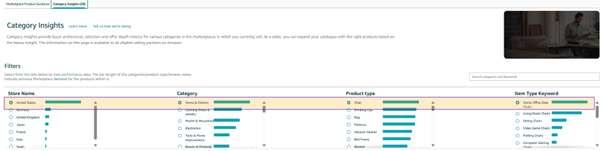
- Scroll down to the section with ‘Return ratio’:
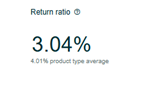
b/ By keyword:
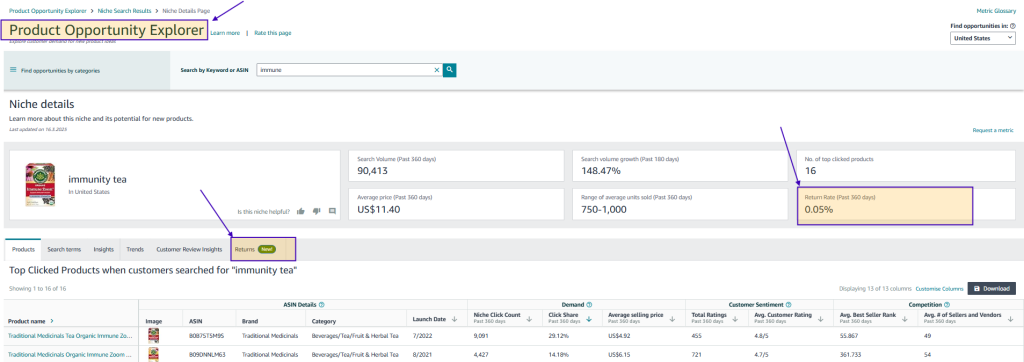
- Seller Central>Menu>Growth>Product Opportunity Explorer.
- Search for a keyword.
- The following example shows the return rate for the keyword ‘immunity tea’ over the last 360 days (meaning 0.05% of orders were returned when customers searched for this keyword):
Storage Fee:
- Amazon charges monthly storage fees, which you can estimate using tools such as Xray Profit Calculator (Helium 10) or the FBA Revenue Calculator (covered by Eazyppc in a previous post). Keep the following points in mind.
- October – December: Storage fees are 2.5 to 3 times higher than during the rest of the year. If you have excess inventory during this period, the Storage Fee can actually exceed your profit — a common issue for new sellers who have not yet accurately forecasted sales volume and market demand.
- New seller benefit: If your account is newly created and you are using FBA, Amazon waives storage fees for the first 6 months -> check with your Amazon Account Manager for the latest information.
6/ Costs to Watch Out for with Trending Products
If you are selling a trending product (refer back to the posts on Trends), you need to account for the following risks:
- When search volume drops sharply after a trend peaks, leftover inventory becomes difficult to sell, leading to rising storage costs.
- Solutions:
- Lower the price to clear inventory quickly.
- Liquidate excess inventory to other partners.
- Choose trends that align with your financial capacity.
7/ Inventory Management to Avoid Out of Stock (OOS)
Keeping sufficient stock in the warehouse is essential for maintaining sales momentum and search ranking on Amazon. As your product sells well, inventory levels will gradually decrease. Therefore, you need to regularly monitor your inventory levels to avoid falling into an Out of Stock (OOS) situation.
If a product goes out of stock, its organic rank will drop because Amazon prioritizes displaying in-stock products. Once you restock, recovering your previous ranking takes time and may require significantly more advertising spend to rebuild your Organic Rank.
Effective Inventory Management Solutions
- When inventory levels are running low, you can take the following steps to minimize ranking loss (also known as a rank drop):
- Reduce your advertising budget to avoid accelerating sales when you do not have enough stock to fulfill demand.
- Slightly increase your price to slow down the sales velocity and extend the time your remaining inventory lasts.
- You can review inventory metrics at:
📌 Seller Central > Menu > Inventory > FBA Inventory.
Calculating when to place the next reorder depends on many factors such as the manufacturer’s lead time, shipping duration, etc. — therefore, Eazyppc is unable to provide a universal formula or calculation method within the scope of this post.
Tất cả nội dung trên blog này chỉ nhằm mục đích cung cấp thông tin và chia sẻ kinh nghiệm cá nhân về kinh doanh trên Amazon. Eazyppc.com không đảm bảo bất kỳ kết quả cụ thể nào từ việc áp dụng các chiến lược hoặc thông tin được chia sẻ.
Việc kinh doanh có thể tiềm ẩn rủi ro, và mỗi cá nhân cần tự nghiên cứu, đánh giá trước khi đưa ra quyết định. Eazyppc.com không chịu trách nhiệm đối với bất kỳ tổn thất, thiệt hại nào phát sinh từ việc áp dụng thông tin trên blog này.


Chấp thuận Điều khoản & Chính sách
Trước khi tiếp tục truy cập website Eazyppc.com, bạn vui lòng đọc và đồng ý với: