(11.3) Combined FBA and FBM Strategy on the Same Product ASIN

Combined FBA and FBM Strategy on the Same Product ASIN
Eazyppc welcomes you to the article ‘Combined FBA and FBM Strategy on the Same Product ASIN’ – you should read and thoroughly understand the previous articles, as Eazyppc uses terms and concepts explained in earlier posts throughout this one.
Articles you should review before reading this one:
Combining FBA & FBM (Seller-fulfilled shipping) on the same ASIN is an optimal approach for Sellers currently using FBA. The main goal is to avoid Out of Stock situations – meaning the available inventory Amazon can ship to customers drops to zero.
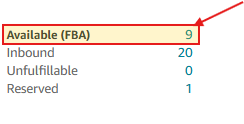
Below are the most common reasons FBA Sellers are prone to going out of stock:
- The product sells faster than expected.
- An unexpected trending surge occurs – unpredicted, causing a sudden spike in purchase volume.
- Restocking issues arise: slow manufacturing, delayed shipment to the US, inventory stuck at a warehouse, flight delays, or Amazon taking too long to process the goods…
When an Out of Stock situation occurs, Amazon may penalize the Seller’s inventory management performance score, causing the product to lose visibility after restocking. Worse, the Seller loses all organic rank – the ranking they spent time and budget to achieve. Once restocked, you are forced to reinvest ad spend just to try to reclaim your previous position – this is very costly and essentially means starting over from scratch.
In particular, if your product is riding a Trend and your FBA units run out, you will miss a significant number of orders if you have no backup plan in place.
-> You should set up an FBM system as a backup option.
When FBA inventory is running low (for example, only 5–10 units remaining), the Seller can:
- Raise the FBA price significantly so customers are discouraged from buying it. Set the FBM price lower than the FBA price.
- Let FBM capture the Buy Box → customers will purchase through FBM.
- In advertising campaigns, simply add the FBM SKU and that’s it.
This way, you maintain orders and traffic. Once FBA inventory has been restocked:
- Disable the FBM SKU in your advertising campaigns.
- Lower the FBA price back below the FBM price.
- Raise the FBM price or set the FBM stock quantity back to 0.
How to quickly create an FBM Listing on an existing FBA product:
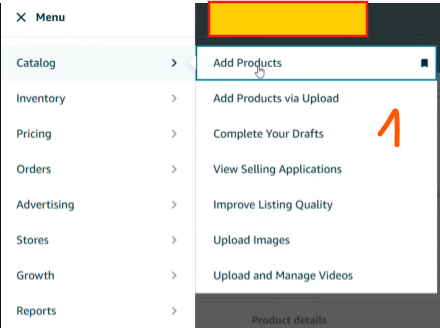
- Go to Add a Product:
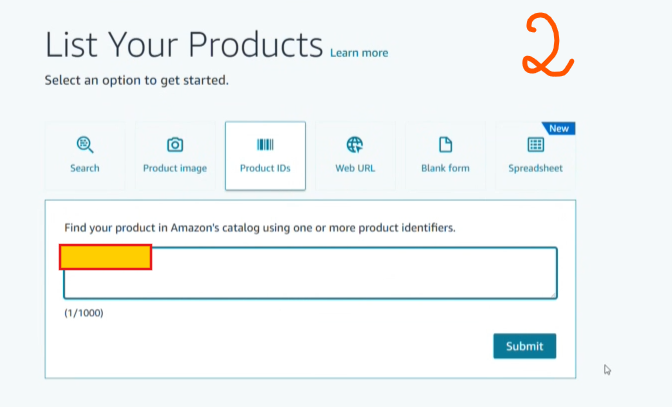
- Enter your ASIN -> click Submit:
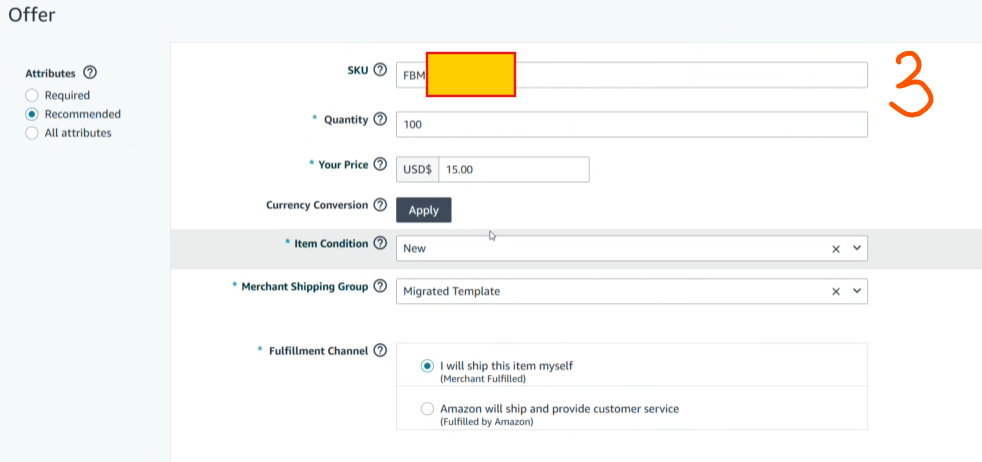
- Create a new SKU for FBM, enter a price lower than FBA. Configure the settings as shown below:
Tất cả nội dung trên blog này chỉ nhằm mục đích cung cấp thông tin và chia sẻ kinh nghiệm cá nhân về kinh doanh trên Amazon. Eazyppc.com không đảm bảo bất kỳ kết quả cụ thể nào từ việc áp dụng các chiến lược hoặc thông tin được chia sẻ.
Việc kinh doanh có thể tiềm ẩn rủi ro, và mỗi cá nhân cần tự nghiên cứu, đánh giá trước khi đưa ra quyết định. Eazyppc.com không chịu trách nhiệm đối với bất kỳ tổn thất, thiệt hại nào phát sinh từ việc áp dụng thông tin trên blog này.


Chấp thuận Điều khoản & Chính sách
Trước khi tiếp tục truy cập website Eazyppc.com, bạn vui lòng đọc và đồng ý với: