(7.3) Using the Category Tree – How to Find Potential Products Directly on Amazon

Using the Category Tree – How to Find Potential Products Directly on Amazon
Eazyppc welcomes you to the article ‘Using the Category Tree – How to Find Potential Products Directly on Amazon’ – you should read and thoroughly understand the previous articles, as Eazyppc uses terms and concepts that were explained in earlier posts.
Articles you should be familiar with before reading this one:
As analyzed in the What Are Keywords article, when acting as a customer searching for products on Amazon, using the category tree is often limited because the navigation is inconvenient and it is difficult to access products quickly. However, if you are in the process of doing market research to find potential products to sell, the category tree becomes an extremely useful tool.
Suppose you are looking for products in the Beauty & Personal Care category. You can follow this process:
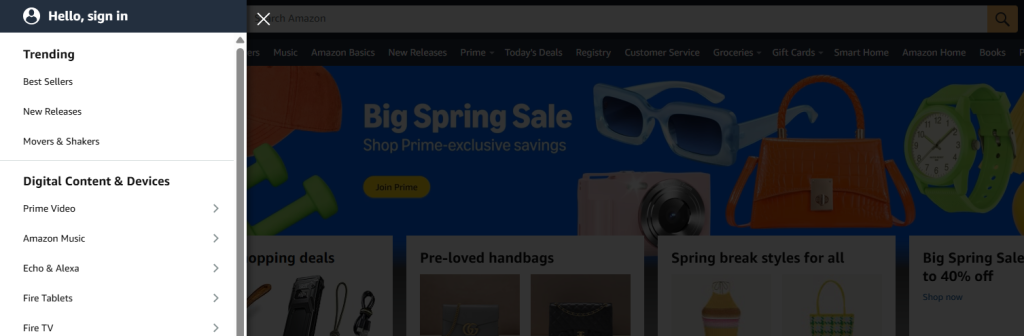
- Go to the category tree and click on one of the options under Trending – Best Sellers, New Releases, Movers & Shakers
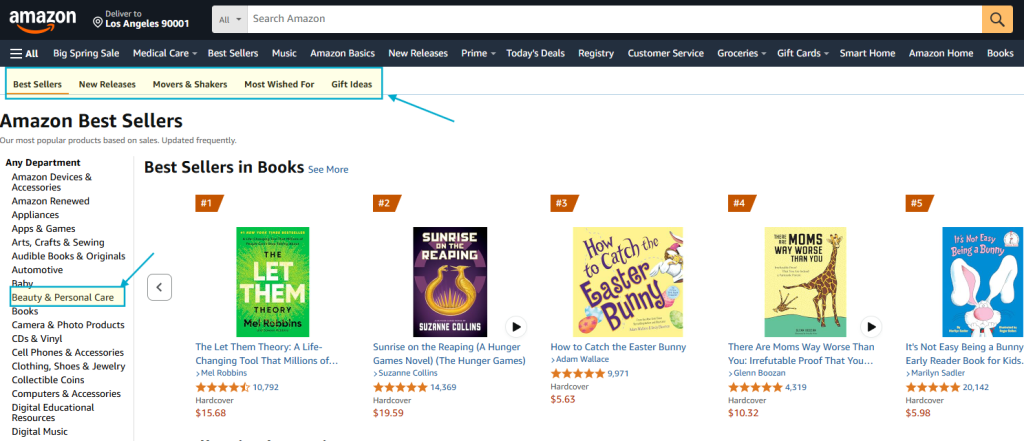
- While on the Best Sellers tab, click further into the category you are researching. Amazon returns 60 products that Amazon has ranked as Best Sellers in this product niche.
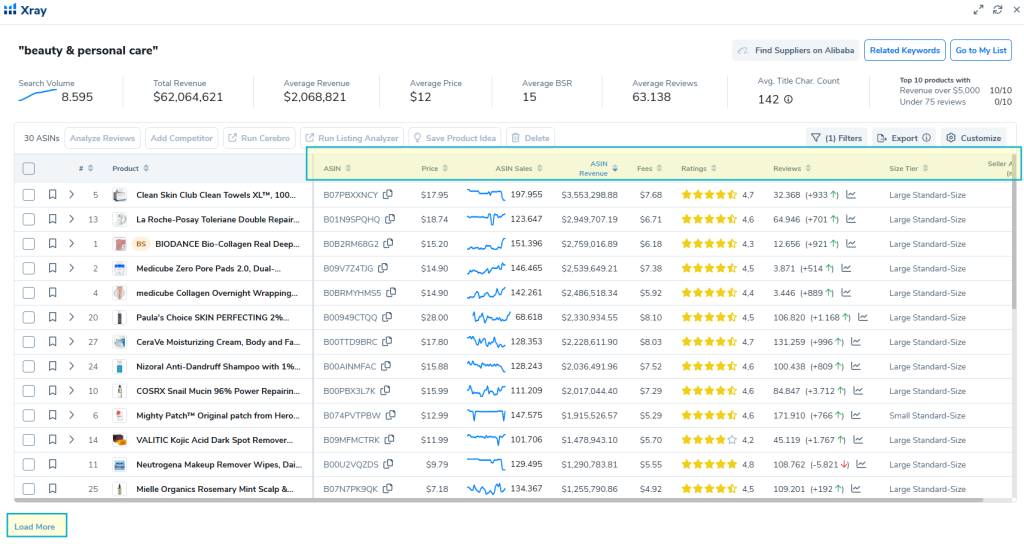
Here, you use the Helium10 Xray tool to download the data results – with the data fields Eazyppc recommends as shown in the image.
You can click ‚Load more’ to retrieve the maximum number of products available, sort by sales, and filter out ads.
- Next, repeat the data download process for all remaining sections of the Beauty & Personal Care niche:
- New Releases (the best-selling new products – you can pause here and review all products in the new arrivals section following the process Eazyppc has outlined)
- Movers & Shakers (products with the strongest growth in sales rank (BSR))
- Most Wished For (products most frequently added to customers’ wish lists)
- Gift Ideas (products most frequently purchased as gifts)
- From the 5 downloaded data files, you can check which ASINs appear across multiple files.
- For example: ASIN B012345678 appears in both the New Releases and Gift Ideas files -> meaning there is a high probability that this product is newly launched & riding a seasonal gifting trend. You then evaluate it using the steps in the article series (6.) that Eazyppc has outlined.
Tất cả nội dung trên blog này chỉ nhằm mục đích cung cấp thông tin và chia sẻ kinh nghiệm cá nhân về kinh doanh trên Amazon. Eazyppc.com không đảm bảo bất kỳ kết quả cụ thể nào từ việc áp dụng các chiến lược hoặc thông tin được chia sẻ.
Việc kinh doanh có thể tiềm ẩn rủi ro, và mỗi cá nhân cần tự nghiên cứu, đánh giá trước khi đưa ra quyết định. Eazyppc.com không chịu trách nhiệm đối với bất kỳ tổn thất, thiệt hại nào phát sinh từ việc áp dụng thông tin trên blog này.


Chấp thuận Điều khoản & Chính sách
Trước khi tiếp tục truy cập website Eazyppc.com, bạn vui lòng đọc và đồng ý với: