(4.1) Top of Search – PPC Ad Placement Positions on Amazon

Top of Search – PPC Ad Placement Positions on Amazon
Eazyppc welcomes you to the article ‘Top of Search – PPC Ad Placement Positions on Amazon’ – you should read and thoroughly understand the previous articles, as Eazyppc uses terms that were explained in earlier posts throughout this one.
Note: For each ad campaign, each ASIN, and each keyword, the performance of ad placements will yield different results — therefore, we should not make blanket statements about which placement is the best, worst, or most effective in a general context.
In this article series, Eazyppc will try to explain the most important aspects to help you:
- Understand the display positions for Sponsored Products ads.
- Start adjusting your budget based on the ad performance of each Sponsored Products placement.
- Understand the customer shopping journey & the challenges to overcome for each ad display position.
Amazon’s advertising platform offers the following ad types:
- Direct advertising on Amazon: Sponsored Products, Sponsored Brands, Sponsored Display (this one is quite interesting and can also appear across Amazon’s ecosystem, such as websites distributed by Amazon)
- Advertising within Amazon’s ecosystem: Sponsored TV (on Twitch, FreeVee, etc.)
- Advertising via Amazon DSP (Demand-Side Platform): Helps reach customers not only on Amazon but also on other advertising partner sites outside the Amazon ecosystem.
In addition, there are other advertising methods such as using Amazon Attribution, Social Media discount codes, etc.
However, the primary ad type used to drive strong organic ranking and revenue for the majority of products and categories is Sponsored Products. Therefore, this article focuses on the display positions for Sponsored Products ads. For other ad types, Eazyppc will break them down into separate articles/topics in future sections.
1/ Overview of Sponsored Products Ad Placement Positions:
The display positions of Sponsored Products on Amazon include the following:
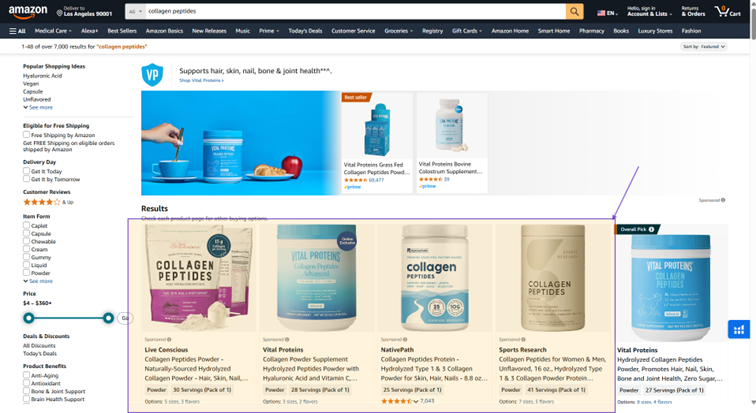
On the search results page:
- Top of Search position: Ads appear at the very top of the page, before the first organically ranked products (usually Big Players).
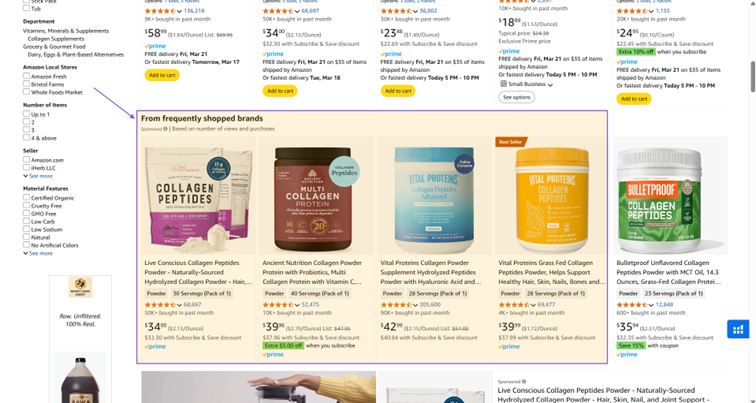
- Remaining positions on the search results page (Rest of Search): All Sponsored Products ad positions except the Top of Search position on the search results page. – Includes positions in the middle, bottom of the page, and subsequent pages of the search results.
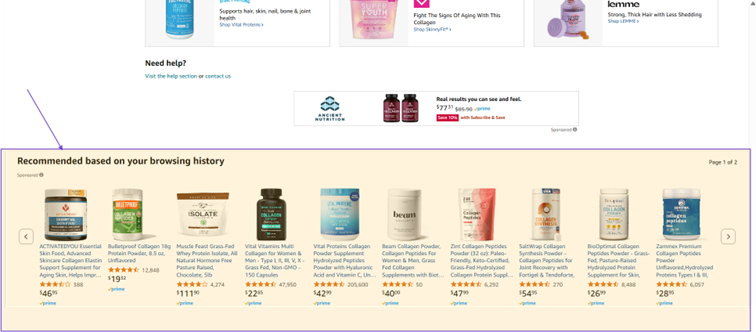
On the product detail page:
- Ads can appear on product detail pages in this section.
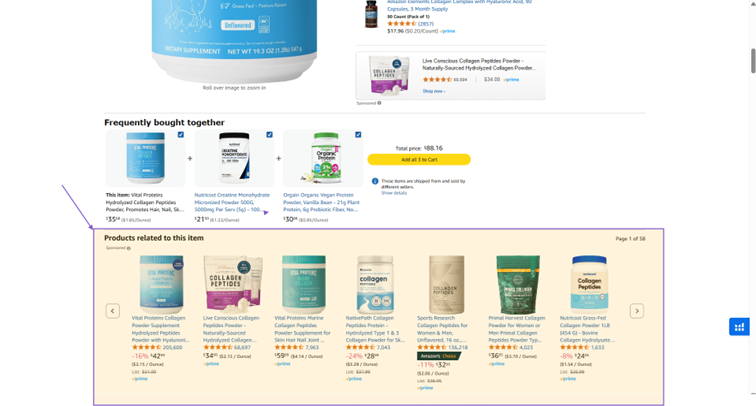
In addition, Sponsored Products has 2 other placement types: Off Amazon & Amazon Business.
Off-Amazon Ad Placement:
- Third-party websites and apps: Ads can appear on websites and apps not owned by Amazon but that are partners within Amazon’s advertising network.
Off-Amazon ad display was previously handled exclusively through Amazon DSP, but there is currently a Beta version for Sponsored Products that can be adjusted directly in Seller Central > Advertising > Campaign.
Amazon Business Ad Placement: Ads appear on Amazon’s platform dedicated to businesses (this one doesn’t require much attention; you can read more about it from other sources).
2/ How to Check Placement Data
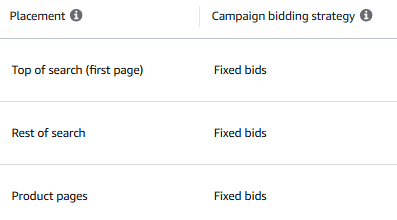
After 2–4 weeks of running ad campaigns, you can check Placement data as follows: Seller Central > Advertising > Campaign Manager > Campaign > Bid adjustment.
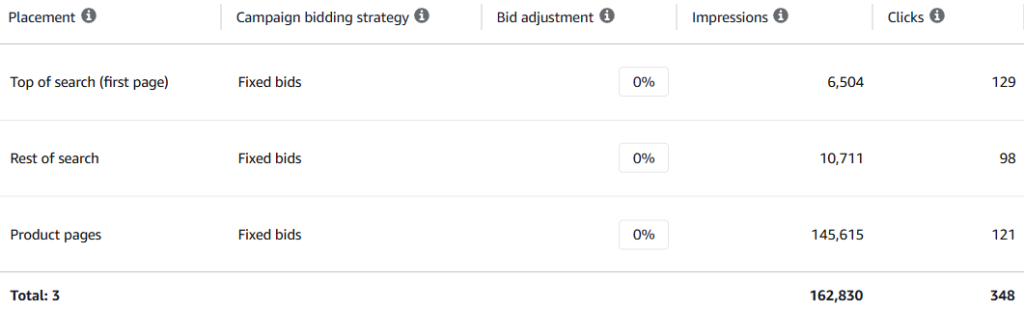
Here, you can analyze the metrics and adjust the % bid increase by placement position in the Bid adjustment section.
3/ Top of Search Placement for Sponsored Products:
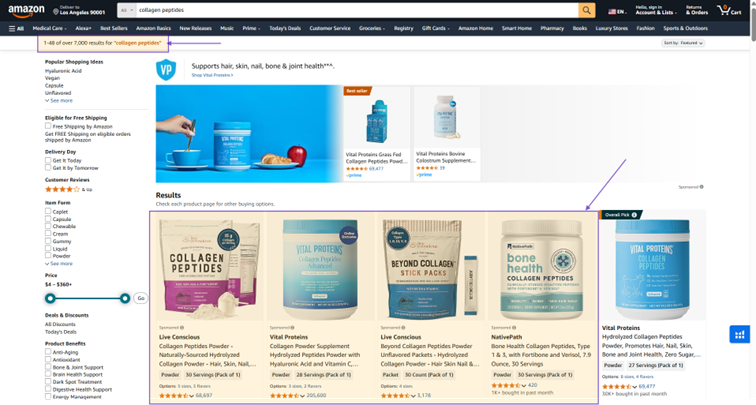
As mentioned above, the first 4 products appearing at the top of the main search results page through advertising are the 4 Top of Search positions.
However, you should consider the number of competing products (7,000) competing for these 4 positions. Therefore, the bid and CPC (cost per click) for the keyword ‘collagen peptides’ as shown in the example is very high in order to secure a Top of Search placement.
This placement is better suited for products with high conversion rates that already have many reviews and good ratings to retain customers — once a customer clicks on the ad, they are less likely to browse away and more likely to convert into a purchase immediately. Additionally, during the honeymoon period (the first 2 weeks of a product launch), some well-performing products running ads may also be prioritized by Amazon into these 4 Top of Search positions.
After running ads for some time, Amazon Advertising will provide data on the performance of each ad placement across each campaign. From this data, you can make informed decisions about how to allocate your advertising budget across the different placements.
Tất cả nội dung trên blog này chỉ nhằm mục đích cung cấp thông tin và chia sẻ kinh nghiệm cá nhân về kinh doanh trên Amazon. Eazyppc.com không đảm bảo bất kỳ kết quả cụ thể nào từ việc áp dụng các chiến lược hoặc thông tin được chia sẻ.
Việc kinh doanh có thể tiềm ẩn rủi ro, và mỗi cá nhân cần tự nghiên cứu, đánh giá trước khi đưa ra quyết định. Eazyppc.com không chịu trách nhiệm đối với bất kỳ tổn thất, thiệt hại nào phát sinh từ việc áp dụng thông tin trên blog này.


Chấp thuận Điều khoản & Chính sách
Trước khi tiếp tục truy cập website Eazyppc.com, bạn vui lòng đọc và đồng ý với: