(3.1) Why Does Keyword Bid Matter?

Why Does Keyword Bid Matter?
Eazyppc welcomes you to the article “Why Does Keyword Bid Matter”. To get the most out of this content, you should be familiar with the previous lesson – “Sales Benchmarks for New Market Entrants“. If you haven’t read it yet, you can go back and review the key information there.
First of all, a keyword bid is the amount you expect to pay Amazon each time a customer clicks on your product ad based on that keyword. However, the actual amount you pay per click, known as CPC (Cost Per Click), may be lower than the bid you set.
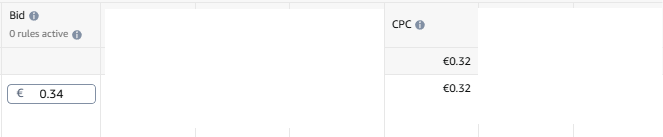
The actual CPC is determined through Amazon’s auction system (the winning ad only needs to pay the equivalent of the next highest bid), based on the competitiveness of the keyword and the quality score of the ad and Listing. However, you should use the bid as an anchor for your advertising costs, since CPC cannot be predicted before running ads. Through this article, you will better understand why the bid will determine how you play the game.
Amazon offers many different types of ads, but keyword-based Sponsored Products ads are the primary choice. The reason is that this type of ad helps: -> The Amazon Bot identify and index your product for the right keywords -> which in turn improves your organic rank. This leads to your product reaching more customers, increasing sales and profit. As a result, this ad type typically accounts for around 70–80% of total ad spend for most products.
Furthermore, keyword bids are a critical factor in estimating advertising costs, which directly affects your profit margin and overall final profit. Understanding how bids work will help you plan your Amazon business more effectively.
1/ If you run ads with a high bid:
When you set a high bid for a keyword, your advertising costs on Amazon will increase, especially during the early stage when a product first launches. This requires you to prepare a substantial budget to push your product into prominent positions on the search results page. Without careful calculation, you may easily run out of ad budget after a period of time. This prevents the product from sustaining revenue or achieving growth.
However, a high bid can also be seen as a barrier advantage. It creates a barrier for competitors with limited capital or insufficient cash flow to sustain long-term advertising. Below are 4 important characteristics to consider when selling a product with a high keyword bid.
a/ Bids can gradually decrease over time as the product achieves a good organic rank:
- As the product starts to accumulate more orders and a stable sales history, the Amazon algorithm will display the product in better positions -> reducing advertising costs.
- Example: At the start, you may need to pay $5 per click (CPC). But once the product has accumulated enough positive reviews, a good conversion rate (CVR), and achieved a high rank, the bid can drop to $3 while still delivering a comparable — or even better — level of traffic.
b/ If a keyword has high search volume, even a lower bid can still drive traffic:
- For keywords with high search volume, even if you don’t set the highest bid, your product still has the opportunity to appear in lower positions and attract customers.
- Example: For a keyword with 100,000 searches per month, even with a low bid, your product may still appear later in the day or when competitors run out of their ad budget, saving costs while still reaching customers.
c/ If the conversion rate is high, you can still sustain a high bid:
- A product with a good conversion rate (CVR) can withstand a high bid, because each click delivers more value than the cost incurred.
d/ If the product niche has few competitors, climbing to the top of search page 1 is faster:
- In low-competition niches, even with a high bid, you can quickly achieve a good organic rank thanks to fewer competitors bidding on ads.
2/ Methods for checking keyword bids:
To determine keyword bids, you can apply the following simple and effective methods.
a/ Helium10 – Suggested PPC Bid:
When using Helium10, you can check the suggested bid for each specific keyword. For example, use the Cerebro tool to scan an ASIN in the “car battery jump starter” niche:
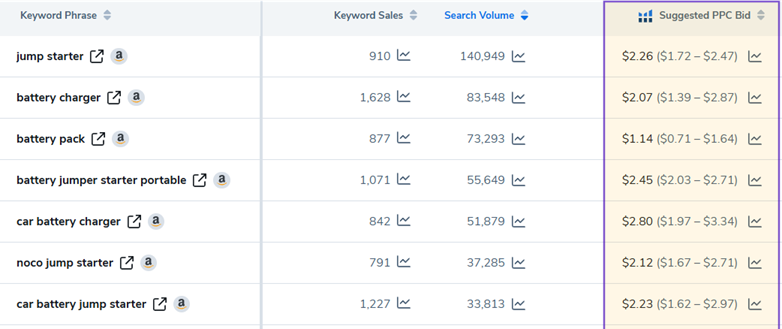
Based on this data table, you can do a quick calculation: For the keyword “jump starter”, the conversion rate (CVR) for a new product typically falls around 10%. This means you need approximately 10 clicks to generate one order. If the bid is $2.26 per click, the cost to acquire one order would be 2.26 x 10 = $22.60.
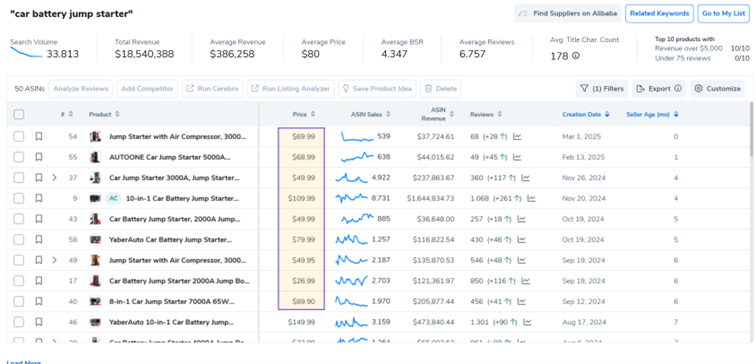
Assuming you sell the product at $49.99 in the early stage, the profit before deducting other fees outside of advertising costs would be 49.99 – 22.60 = $27.39. This means the advertising cost for the keyword “jump starter” accounts for up to 45% of the selling price — a ratio that warrants careful consideration.
Or use Helium10 Magnet
b/ Using Seller Central (if you already have an Amazon account):
If you already have a Seller Central account, you can check bids as follows:
– Go to Logo Menu > Advertising > Campaign Manager.
– Create a new campaign, add the ASIN you want to check, and enter the main set of keywords related to that ASIN. Then pause that campaign.
– Next, go to Campaign > Ad Group > Targeting to view the suggested bids for your selected keywords.
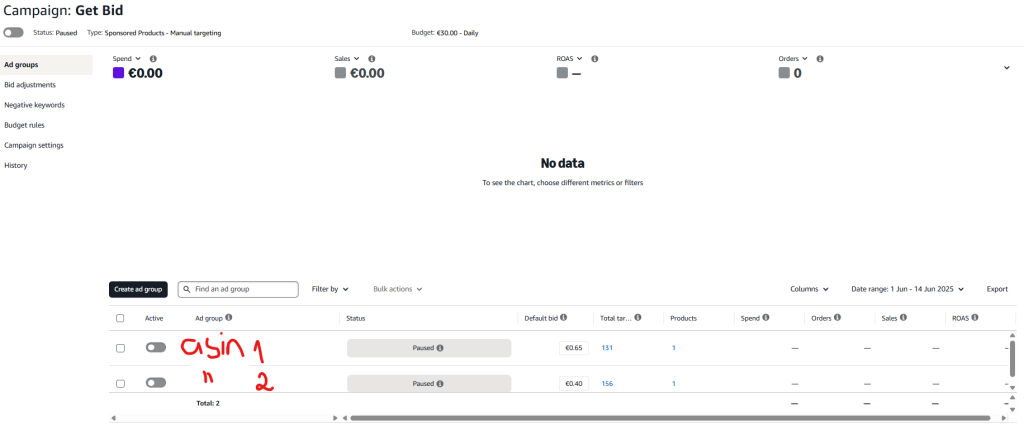
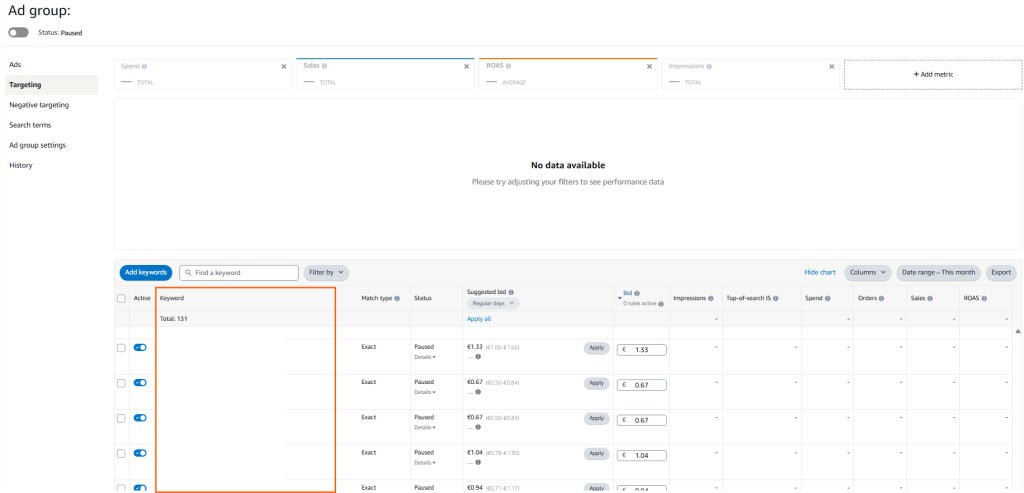
You can also create an FBM (Fulfillment by Merchant) Listing similar to the product you plan to sell to check the bid, then set the ‘Available (FBM)’ quantity to 0 in Menu > Inventory > ‘Manage All Inventory’. After creating it, follow the same steps above to get more accurate results.
c/ Difference between Helium10’s Suggested PPC Bid and Amazon Advertising on Seller Central
Helium10 defines the Suggested PPC Bid as follows: “Suggested bid and bid range are calculated from a group of winning bids for ads that are similar to yours. You can choose to use the suggested bid, or any bid in or outside of the bid range.”
- Helium10 collects data from winning bids on Amazon to provide an average price.
- This is the price that products from winning ads in that niche are currently paying to display their ads, but it does not always accurately reflect the situation for a new product (your product).
- Eazyppc recommends using the suggested bid from Amazon Advertising on Seller Central for planning advertising costs, product research, and launching official campaigns, as it is closer to real-world conditions.
In addition, Search Volume does not always directly determine a keyword’s bid:

Therefore, before investing in a product, you should check the bid at multiple different points in time (today, a few days later, 1 week, 2 weeks, etc.) to monitor fluctuations, and then calculate your business plan and profit more accurately.
d/ What if you only run ads with a low bid for a keyword that has a high suggested bid?
Going back to the “jump starter” example: Helium10’s suggested bid is $2.26. If you only set a bid of $0.50 for a new product, this bid level is much lower than the winning bids in the market. As a result, the product may only appear on lower search pages (page 3, 4, 5…), where few customers pay attention, or you may have to wait until late in the day for your ad to get impressions when competitors exhaust their ad budgets.
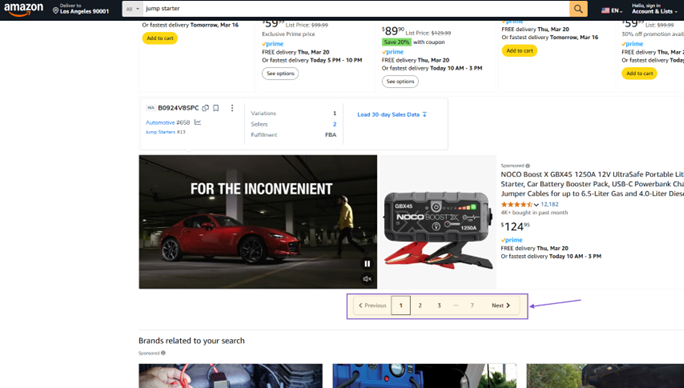
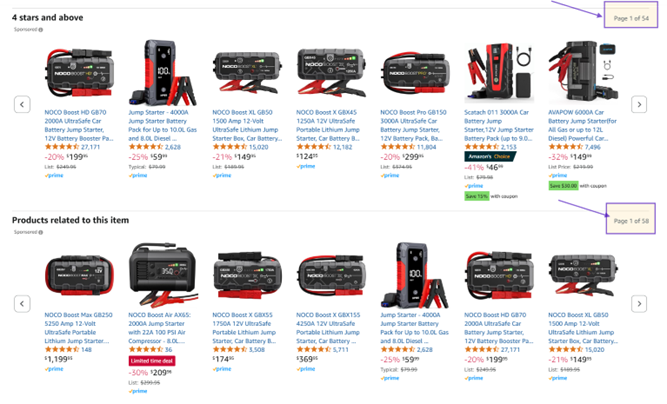
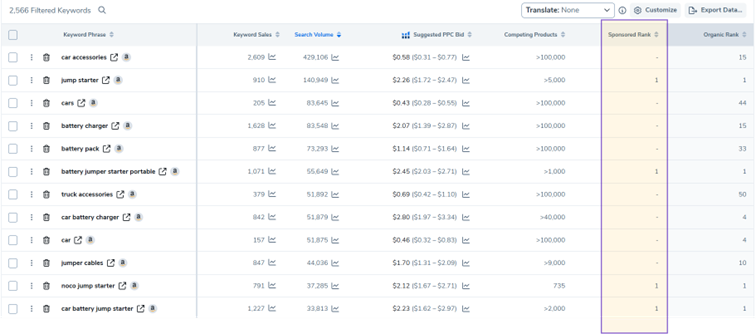
To check the ad placement position for your product or your competitors, you can use tools like Helium10 Cerebro, Keyword Tracker, etc.:
Tất cả nội dung trên blog này chỉ nhằm mục đích cung cấp thông tin và chia sẻ kinh nghiệm cá nhân về kinh doanh trên Amazon. Eazyppc.com không đảm bảo bất kỳ kết quả cụ thể nào từ việc áp dụng các chiến lược hoặc thông tin được chia sẻ.
Việc kinh doanh có thể tiềm ẩn rủi ro, và mỗi cá nhân cần tự nghiên cứu, đánh giá trước khi đưa ra quyết định. Eazyppc.com không chịu trách nhiệm đối với bất kỳ tổn thất, thiệt hại nào phát sinh từ việc áp dụng thông tin trên blog này.


Chấp thuận Điều khoản & Chính sách
Trước khi tiếp tục truy cập website Eazyppc.com, bạn vui lòng đọc và đồng ý với: