
Quick Toggle All Ads for a Single ASIN Tool
This Eazyppc tool helps Sellers enable/disable all ads for a single ASIN.
How it works:
- Disable – If a campaign has multiple ASINs, the tool will only disable the specific ASIN(s) selected by the Seller
- Enable – The tool will only enable ads for the specific ASIN(s) selected by the Seller within active campaigns.
User Guide:
Sellers, please follow the instructions exactly – if you make a mistake at any step, the tool will not work. An “Invalid” error means the file uploaded by the Seller does not match the instructions; please go back to the first step. Thank you!
1/ Upload CSV File (Products List)
Go to Seller Central > Advertising > filter the ASINs that need ads enabled/disabled
- For example, select the last 30 days – Clicks > 100
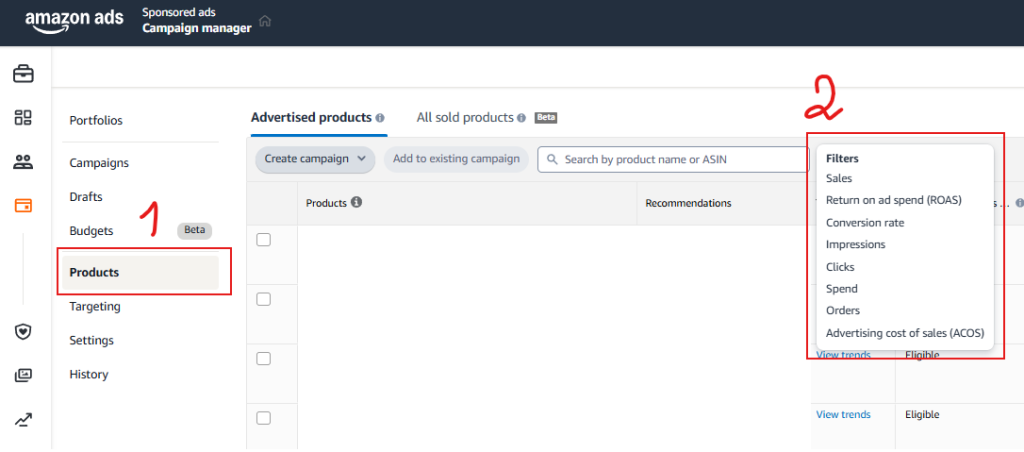

Then export the CSV file (Products List)

Then, drop the CSV file into the Upload CSV File (Products List) section on the Tool. After that, review the ASINs list to make sure it is correct.

2/ Select the action
In this section, select either Disable or Enable
3/ Upload Excel File (Campaigns Data)
First, go to Seller Central > Menu > Advertising > Bulk Operations
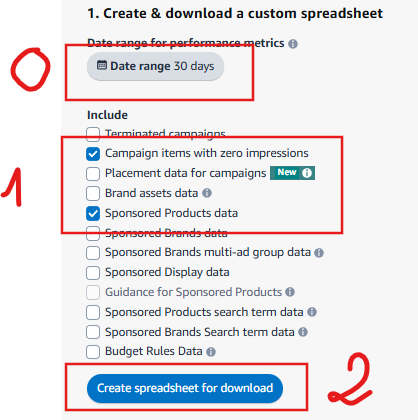
Then, drop the Excel file into the Upload Excel File (Campaigns Data) section on the Tool
If the file is incorrect, the Tool will show Error X
Otherwise, the tool will display a message like this (meaning 9 ASINs in the CSV file are present in 2,980 ad-related entries that need to be enabled/disabled)

Then download the Excel file
4/ Upload the completed Excel file to Bulk Operation to enable/disable campaigns
Seller Central > Advertising > Bulk Operation >

Wishing you success!
You must be logged in to view this content. You must be logged in to view this content.
🎯 ASIN Processing Tool
Offline tool để xử lý CSV và Excel files, cập nhật ASIN campaigns
📋 Bước 1: Upload CSV File (Products List)
Click hoặc kéo thả CSV file vào đây
File CSV phải có column 'Products' đầu tiên
⚙️ Bước 2: Chọn hành động
📊 Bước 3: Upload Excel File (Campaigns Data)
Click hoặc kéo thả Excel file vào đây
Hỗ trợ file lên đến 500MB (.xlsx, .xls)
